


Line-Locked Color Zones
If an entire color zone sits inside a single row or a single column, that zone owns the only kitty allowed in that line. Immediately stamp paw-marks on every other square in the same row or column outside that color zone.
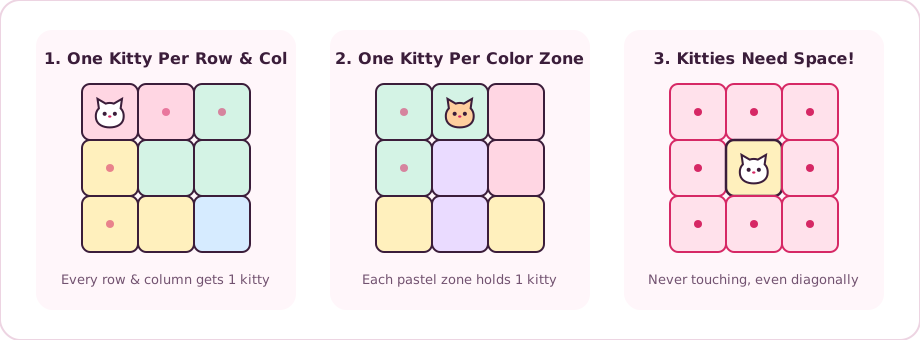
Place one kitty in every row, column, and pastel zone. Kitties never touch—not even diagonally!
Purr-fect Deduction!
Copied to clipboard!
Meow-ch!
You made 3 wrong kitty guesses on this board. Give it another paw!
Daily 7x7 Challenge
About the game
Catdoku is a cozy browser logic puzzle that blends territory deduction with adorable pastel kitties. Instead of juggling nine digits like traditional Sudoku, every Catdoku board asks you to place one kitty inside each row, each column, and each irregular colored zone—with one crucial twist: no two kitties may touch each other, not even diagonally at the corners.
Every grid on this Catdoku site is generated with a verified unique solution, meaning pure reasoning always leads to the answer. Start with today's shared Daily 7x7 Catdoku puzzle to compete on the speed leaderboard, or warm up with unlimited 5x5, 6x6, 7x7, and 8x8 boards whenever you want a two-minute brain break.
Quick start
Learning Catdoku takes less than thirty seconds, whether you play on a laptop mouse or a mobile touchscreen. Follow these four steps to clear your first board without guessing.
Scan the Catdoku grid for the smallest colored territories first. A single-tile zone must hold a kitty immediately, and a two-tile or three-tile zone drastically limits which rows, columns, and adjacent corners remain open for neighboring kitties.
Tap or click an empty square once to stamp a cute paw-mark, meaning no kitty can sit there. On desktop or touchscreens, press and drag across a line of empty tiles to sweep paw-marks quickly. Tap a marked tile a second time (or right-click on desktop) to place a kitty.
Whenever you place a kitty, its entire row, entire column, entire colored zone, and all eight surrounding tiles become off-limits. Keep Auto-Paw turned on to visualize those ruled-out squares automatically, or switch Auto-Paw off for manual deduction.
If two kitties clash in the same row, column, color zone, or diagonal corner, Mochi alerts you right away and both tiles wiggle gently. Use Undo to step back cleanly, or tap Hint when a 7x7 or 8x8 Catdoku grid feels tight.
Want deeper walkthrough examples for tough 7x7 and 8x8 boards? Read our complete Catdoku strategy guide.
Zero-guess tips
Every Catdoku puzzle can be solved strictly by logic without trial-and-error guessing. These four reliable patterns will cut your Daily Catdoku solve times in half.
If an entire color zone sits inside a single row or a single column, that zone owns the only kitty allowed in that line. Immediately stamp paw-marks on every other square in the same row or column outside that color zone.
When a color zone has only two empty squares left side-by-side (or stacked vertically), notice which neighboring tiles touch both squares at once. Because one of those two squares must hold a kitty, any tile touching both of them can never hold a kitty.
Look for two different color zones that are completely squeezed inside the same two rows (or two columns). Those two rows are now reserved exclusively for those two zones, letting you rule out every other color living inside those rows.
In larger 7x7 and 8x8 Catdoku boards, L-shaped three-tile zones create strong corner blocks. Even before you know which arm of the L holds the kitty, the inner crook tile touches every square of the L—so you can safely stamp that crook square right away.
Five grid sizes
Switch freely between the shared Daily Catdoku board and four unlimited grid sizes directly above the play area. Every mode opens immediately with zero loading screens.
| Mode | Grid Size | Kitties | Best For |
|---|---|---|---|
| Daily 7x7 | 7x7 | 7 kitties | Competing on the same shared puzzle worldwide and posting your solve time on today's leaderboard. |
| Easy 5x5 | 5x5 | 5 kitties | First-time Catdoku players learning row, column, and no-touching deductions in under a minute. |
| Classic 6x6 | 6x6 | 6 kitties | Relaxed coffee-break sessions with balanced territories and clear logical chains. |
| Clever 7x7 | 7x7 | 7 kitties | Sharper multi-zone eliminations where diagonal blocking opens clever hidden singles. |
| Master 8x8 | 8x8 | 8 kitties | Experienced logic fans looking for deep row-and-zone locking puzzles that reward careful paw-marking. |
Common questions
Yes. Catdoku is completely free to play right in your web browser with no download, no app install, and no sign-up required. Both the Daily 7x7 challenge and unlimited 5x5 through 8x8 practice boards are open to everyone.
Yes. Catdoku works smoothly on iPhone, Android phones, iPads, and desktop browsers. Tap once to stamp a paw-mark, tap twice to place a kitty, or slide your finger across empty tiles to sweep multiple paw-marks in one motion.
In classic Sudoku you fill a 9x9 grid with digits 1 through 9. In Catdoku, there are no numbers at all—you place exactly one kitty in each row, column, and colored territory, and no two kitties may sit next to each other horizontally, vertically, or diagonally.
Yes. Your Daily Catdoku streak, completed puzzles, and optional leaderboard nickname are saved automatically in your browser session so you can track your daily solve history without creating an account.
Every Catdoku puzzle generated here is checked by a solver to guarantee exactly one unique logical solution. You never have to guess—if you get stuck, press Hint to let Mochi highlight a guaranteed kitty or spot an earlier mistake.
Auto-Paw places soft helper dots on tiles ruled out by a kitty you have already placed—across its row, column, color zone, and eight surrounding neighbors. You can toggle Auto-Paw off anytime if you prefer marking every elimination by hand.
Share your Daily Catdoku solve time, favorite trick, or feedback.
No comments yet. Beat today's Daily Catdoku and drop your solve time!